Power Mine ETH Mining: Mobile access to cloud-based Ethereum mining
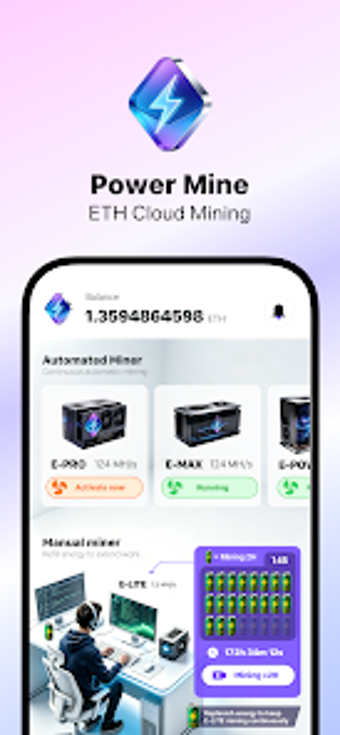
Experience Power Mine ETH Mining from Nexora Innovations, an Android utility that lets users access Ethereum cloud mining without owning physical rigs. The app connects a mobile account to remote mining servers, manages leased hash power, and displays live MH/s and active rig status on a central dashboard. It includes system maintenance utilities, a referral-based team bonus, and activity logs for auditability. Target users are cryptocurrency enthusiasts and mobile users who want hardware-free mining management on Android devices.
What does the app actually do for mobile miners?
Power Mine connects a mobile account to remote Ethereum mining servers and handles leased hash power from within the app. By design, all computational work runs on cloud server clusters, so the mobile role is contract management and monitoring. The tool exposes contract tiers, live MH/s readouts, and activity logs so users can pick a rig level and observe output without managing physical hardware.
Does it slow down your device during operation?
Because mining executes on remote infrastructure, the app does not use the phone's CPU or GPU and therefore avoids local battery and thermals impact. Network polling and dashboard updates drive device activity rather than background hashing, so CPU usage on the mobile device remains minimal. This arrangement preserves local performance while the service reports mining output, but it depends on a stable network connection for timely updates.
Is managing cloud mining from a phone secure?
The platform uses industry-standard encryption and secure authentication to protect account and transaction records, and detailed activity logs record transfers and mining events for auditability. In addition, the app exposes system maintenance utilities intended to keep remote rigs operational. Those elements provide operational visibility and an audit trail, which reduces uncertainty when administering leased contracts from a mobile device.
Do I need technical knowledge to start and scale mining?
Basic onboarding centers on selecting a contract tier and watching hash-rate readouts, so casual users can activate lower-tier contracts with minimal setup. Scaling via higher tiers such as E-LITE or E-MAX and growing a referral-based team bonus requires an understanding of how leased hash power aggregates. The dashboard and logs support both simple monitoring and more active contract management for confident users.
Best for mobile-first miners who accept a cloud-dependency trade-off
Power Mine suits users who prefer managing mining activity from Android devices while delegating computation to external infrastructure. The principal caveat is operational dependency on remote contracts and continuous connectivity, which places uptime and service terms outside the device owner's direct control. For practical use, schedule heavier monitoring during stable connectivity windows and confirm contract tiers before committing to long-running operations.